My AI Agent Needs Secrets, but I Can't Just Paste Them Into Chat
A coding agent eventually asks for something it cannot invent: an API key, a database password, or a cloud credential.
The obvious response is to paste it into the chat.
I tried that. It creates two problems at once. The secret is now part of the conversation, and some agents become much less useful once a credential appears there. They may refuse to handle it directly or stop the workflow that needed it in the first place.
The problem was not really “how do I encrypt a YAML file?”
Chat is the wrong transport channel for secrets.
I wanted the agent to know which secret it needed without asking me for the value in the conversation.
Chat should carry the key name, not the secret
The difference is mostly about where the value enters the system.
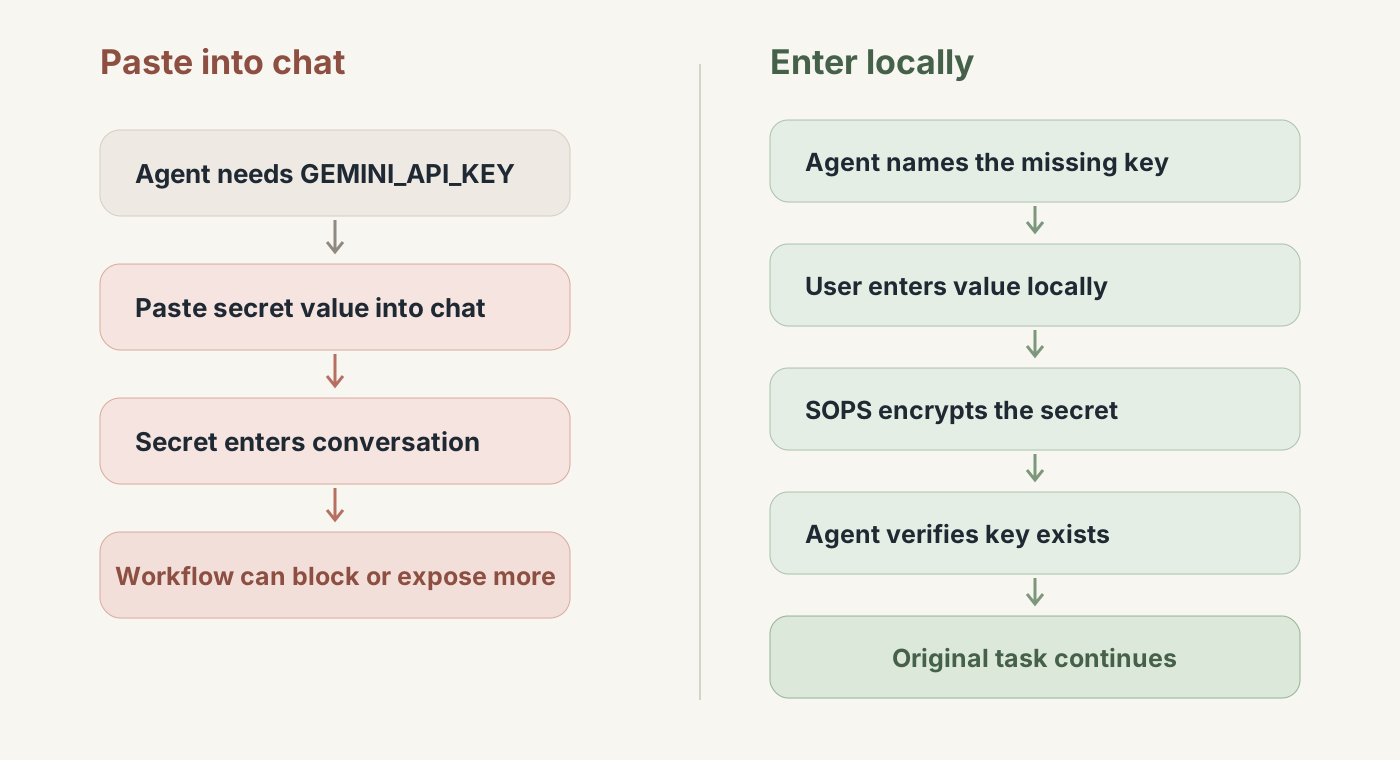
The conversation contains the name of the secret, not its value.
Why .env was not enough
A local .env file is still useful. It solves a common problem: do not commit plaintext credentials.
But with coding agents I wanted a stable way to check which keys exist, add or update one, and let the agent follow the same workflow every time. I also wanted the option to version-control encrypted secret state instead of manually copying .env files between environments.
That is where SOPS + AGE fit.
What SOPS and AGE do
SOPS is a tool for encrypting structured files such as YAML, JSON, dotenv files, and INI files. You keep working with a normal file shape, but sensitive values are encrypted before the file is stored or committed.
AGE is the encryption system I use with SOPS. It gives me a simple public/private key pair. SOPS handles the structured file; AGE provides the key material used to encrypt and decrypt it.
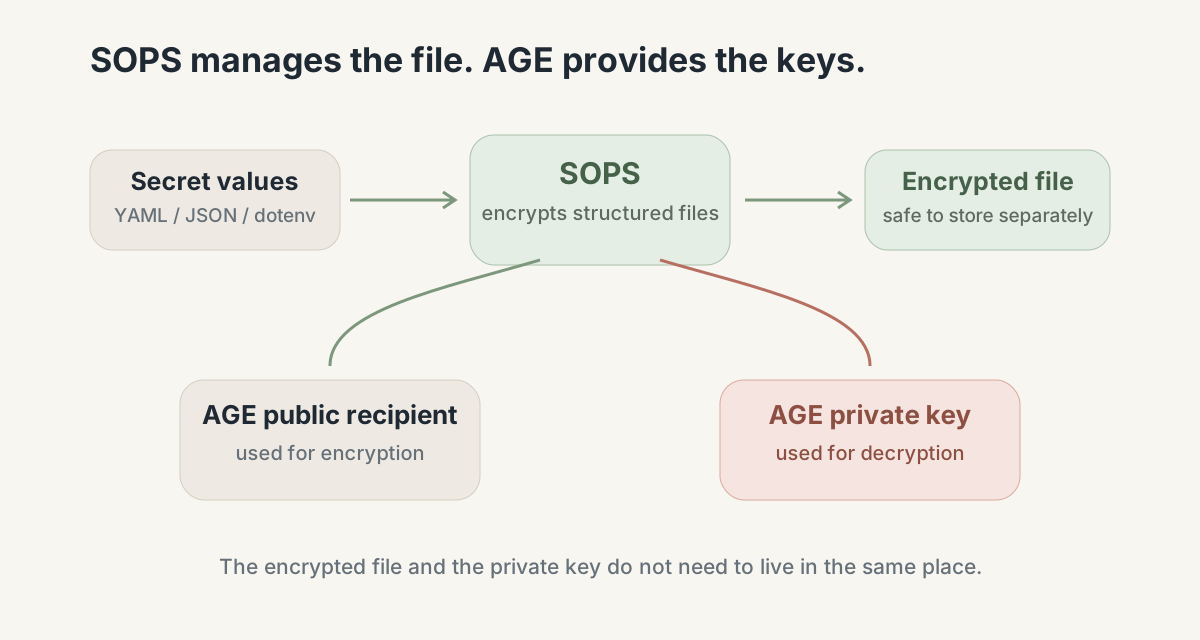
The useful property is that the encrypted file can live separately from the private key needed to decrypt it. Neither SOPS nor AGE solves the agent workflow by itself. They are just the storage layer underneath it.
Give the agent a protocol, not the credential
I wrapped the SOPS operations in a small CLI called secretsctl.sh and exposed that workflow as an agent skill.
The interface is deliberately small:
secretsctl.sh check
secretsctl.sh list
secretsctl.sh get KEY
secretsctl.sh set KEY
secretsctl.sh del KEY
The important command is set.
This would be a bad interface:
secretsctl.sh set GEMINI_API_KEY super-secret-valueThe secret has left the chat, but now it may appear in shell history, process arguments, terminal logs, or an agent transcript.
Instead, set prompts locally with hidden input:
$ secretsctl.sh set GEMINI_API_KEY
Secret value:
The agent only coordinates the flow. The value is entered directly on the local machine.
The skill then adds one important behavioral rule:
Never ask the user to paste a secret value into chat.For example:
Me:
Deploy this project.

Agent:
GEMINI_API_KEY is missing.
Run locally:

  secretsctl.sh set GEMINI_API_KEY

Then tell me when it is ready.

Me:
done

Agent:
verifies the key exists and continues
That is the whole point of the setup. The credential never needed to become a chat message.
The security boundary is deliberately narrow
This setup does not mean the agent process can never see plaintext.
If a command genuinely needs GEMINI_API_KEY, the process using it may receive the decrypted value. An agent with arbitrary local execution and access to those credentials should still be treated according to the normal local security model.
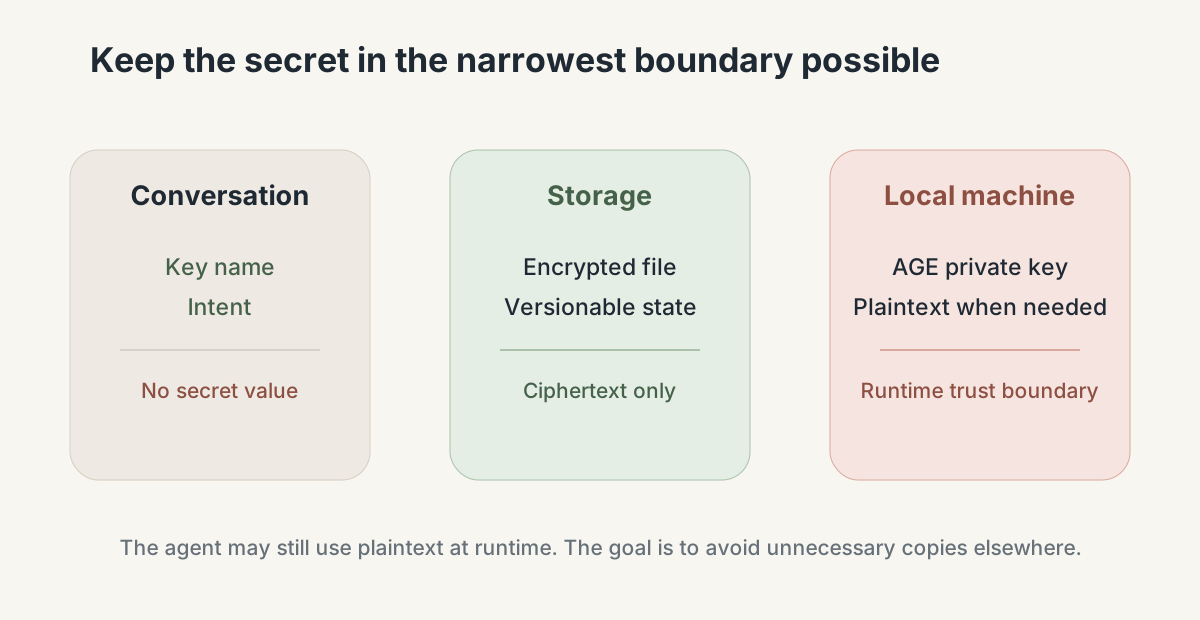
The goal is narrower: keep secret values out of the conversation and plaintext Git history, and avoid passing them as normal CLI arguments when that is not necessary.
Where this fits
For local development and coding-agent workflows, encrypted files are convenient. For production infrastructure, I would still use the controls designed for that environment.
A useful distinction is:
SOPS             = secrets as encrypted files
Vault/SecretsMgr = secrets as a service
This pattern is useful for local agents, personal projects, dotfiles, homelab work, and developer bootstrap. It is not a replacement for production secret rotation, access control, workload identity, or audit systems.
I extracted the reusable skill from my dotfiles into:
https://github.com/ltdthanhdat/shared-skills
The implementation can change. The boundary is the part I want to keep:
code          → Git
config        → Git
secret config → encrypted storage
secret input  → local secure channel
conversation  → intent and key names only
Secrets are infrastructure, not conversation content.